
Navigation:
Home | Screen Shots | Download! | JavaScript
Sitting around one night trying to study for finals, I noticed the screen saver running on my laptop. I couldn't focus on the book in front of me, I kept thinking of a clever way to render those little flakes. Figuring that I would only play for a few minutes, I wound up programming all night, and finished what is essentially version 1.0 of the flakes screen saver (spelled with a lower-case 'f').
That screen saver was called FuzzyFlakes by Barry Dmytro and is included with just about any distro of linux. As it turns out, this was inspired by the ending credits of Azumanga Daioh, one of my favorite animes.. Maybe that's why I liked this so much and made a windows clone of it.
Let's look at the "settings" dialog.
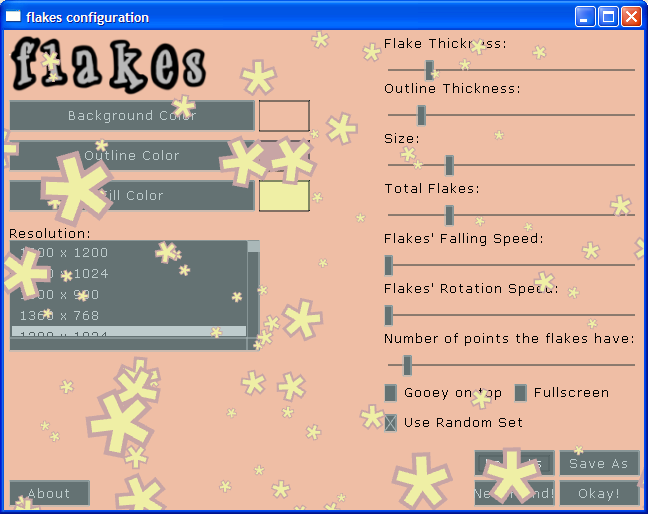
Many of these should be self-explanatory, the first 3 sections control color.
Resolution will determine the resolution at which the screen saver will run. Your settings window will not be of this resolution unless you choose "fullscreen."
Flake Thickness is how thick the fill is while Outline Thickness is how thick the outline is.
The Size is how long each arm of the flake is.
Those speeds are obvious, along with points.
Gooey on top makes the flakes render underneith the widgets. This is usefull if you have a lot of big flakes. It's off by default because it looks cooler.
Fullscreen will make the settings dialog fullscreen next time you run it. (Make sure your resolution is 640x480 or greater for this.)
Use Random Set will load a random "set" of settings each time the screen saver is run.
Save As Will save the current settings to a "set" that you name. You can then load that set using Load As.
Nevermind forgets that anything happened, except for the saved sets.
Okay will save settings and close
Now let's have a look at the colorChooser:
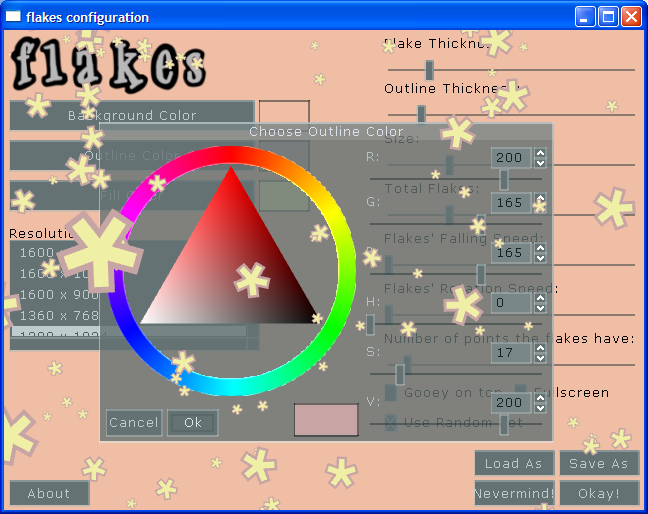
Version 2.0 now includes this handy little color chooser for when you want to pick a color to use in the background/fill/outline. Just click the corresponding button and one of these will pop up.
First off, You can choose the color by clicking the general color on the ring then choose saturation and value in the triangle. That is the easiest way to do things.
If you'd rather just play with RGB or HSV values, you can tweak the sliders on the right. Changing an RGB slider will change the HSV sliders and vice-versa.
Finally, If you know your RGB/HSV value, you can just enter it in those text boxes on the right.
handy isn't it?
A list of possible Questions/Problems and some Answers/Solutions
Problem: It doesn't work at all!
Solution: Get a graphics card that supports opengl, they all do now-a-days.
Problem: It runs very slowly
Solution: Decrease the resolution you have selected. In all honesty, this shouldn't be a problem with anyone. Make sure you're not trying to use a resolution that your monitor doesn't or shouldn't support (like 1280x1024 on a flat pannel with a native resolution of 1024x768).
Question: Can I get Antialiasing turned on here?
Answer: Yes. You have to enable AA for the default 3d settings. If you have the latest nvidia drivers, you can right-click the desktop and choose "NVIDIA control panel" then go 3D settings > Manage 3d Settings > AA > turn off application support and slide the slider.
Question: What's the deal with the odd lines in the windows and some of the widgets?
Answer: Not all that sure really, It seems to be a bug in bslgui or something, if you turn the settings up in the NVIDIA control panel they'll go away (That's how I got the config picture to look nice).
Question: Neat! Can I get this for Mac, Linux, dreamcast, xbox, beos, os/2, etc.?
Answer: the screen saver runs perfectly in Linux under Wine, Although I don't know how you'll get KDE to start it as a screen saver. As for Mac, DC, Xbox, etc... I wrote this stuff using SDL and opengl, those libraries are incredibly portible, so it is possible to get this to work on a different platform. The only piece of code that would need to be changed is the registry stuff.
Anything else? uhh, contact me: MSN/email: scalloped_llama at hotmail.com, ICQ:45650700, Y!:scalloped_llama, AIM:joeby87 (hooray for trillian!).
Finally, You may have noticed me refering to bsgui as "bslgui", that's my version of bsgui that is heavily modified. If you use bsgui and would like a color chooser, go check out my version of bsgui that's included in the source package in download.
Credit where it's due:
Developed with

 BSGUI
BSGUI
Project hosted by